How Much Storage Do You Need for Manga on Kindle? (2026 Numbers)
If you're staring at the "8 GB" or "32 GB" badge on a new Kindle and wondering whether it's enough for your manga collection, you're asking the right question — and getting the wrong answers everywhere else online.
Most articles tell you "thousands of books" because they assume novels: tiny text files of 1–2 MB each. Manga is the opposite of a novel. Every single page is a high-resolution image, and the file format you pick can swing your library size by 7x. We tested every common workflow on a real Kindle Paperwhite (2024) and a Kindle Scribe so you don't have to.
The TL;DR: How Much Manga Fits on a Kindle in 2026
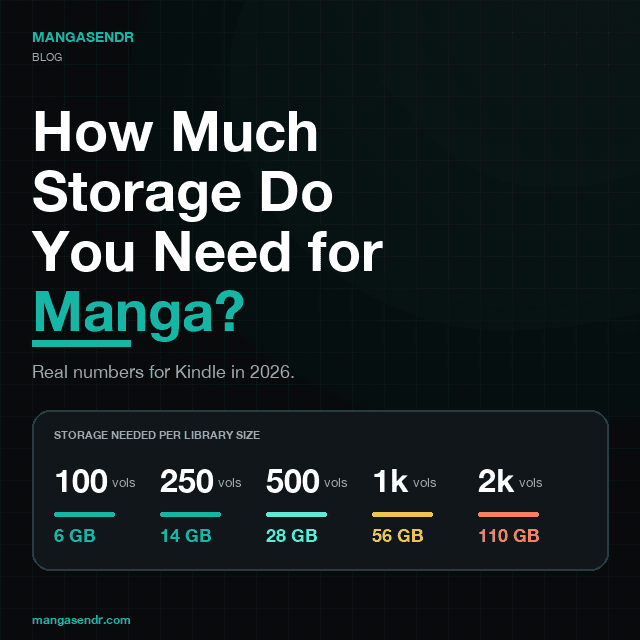
If you build your library the smart way — properly converted EPUB or CBZ optimised for your device's panel — these are the numbers you can count on:
- 100 volumes ≈ 6 GB (fits comfortably on a base 8 GB Kindle)
- 250 volumes ≈ 14 GB (needs the 16 GB Paperwhite Signature Edition)
- 500 volumes ≈ 28 GB (needs a 32 GB Scribe or Oasis)
- 1,000 volumes ≈ 56 GB (you're now in "delete and re-download" territory)
- 2,000+ volumes ≈ 110 GB (no Kindle holds this — rotate via cloud or USB)
For context: One Piece alone, 108 volumes deep, takes around 6.5 GB. A complete Berserk Deluxe set (14 omnibuses) is closer to 4 GB. Vagabond's 37 volumes land near 2.3 GB. The averages above hold up across most shounen, seinen, and slice-of-life series we measured.
Why File Format Matters More Than Volume Count
The single biggest mistake new Kindle manga readers make is sideloading the first file format they find. We took the same volume — 200 pages of Vinland Saga at 2400px source resolution — and ran it through every common pipeline. The results were brutal:
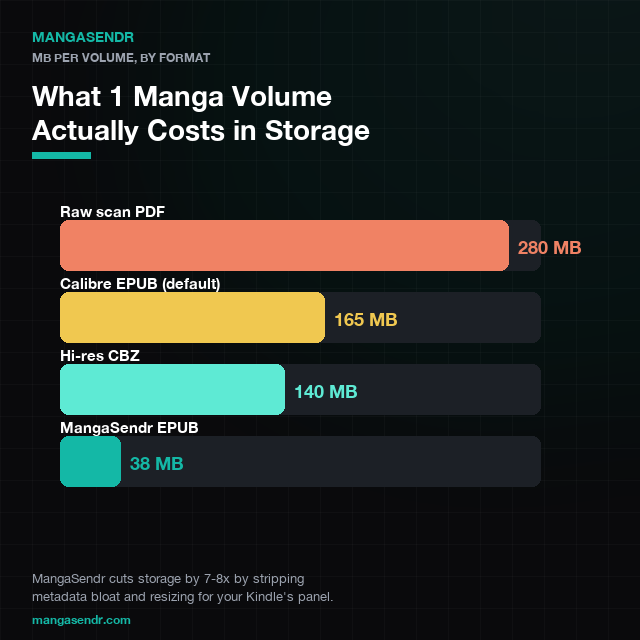
1. Raw Scan PDF — 280 MB per volume
This is what most "free manga downloader" tools spit out. PDFs are the worst possible container for image-heavy content because they bundle every page at full source resolution and add font tables, metadata trees, and a render pipeline that your Kindle has to process on every page turn. A 100-volume library at this size would need 28 GB — which means a base 8 GB Kindle holds about 28 volumes before you run out. That's less than half of One Piece. (Amazon's own Send-to-Kindle documentation still doesn't warn you about this — it just tells you "PDFs are supported.")
2. Calibre EPUB (default settings) — 165 MB per volume
Calibre is the most-recommended free converter, but the default settings don't know what kind of content you're feeding it. It tries to be safe: keeps every image at the highest resolution, embeds JPEG previews, and stores everything in a generic comic-book EPUB profile. You get a 40% reduction over the PDF, but it still means a 100-volume library is around 16.5 GB. Workable on a 32 GB Kindle, painful on anything smaller. (We have a full Calibre tuning guide if you want to fix this manually.)
3. Hi-Res CBZ — 140 MB per volume
CBZ is just a ZIP archive of images. It's lighter than PDF because there's no rendering overhead, and the Kindle's built-in comic reader handles it natively after the file is converted to EPUB or AZW3. But "hi-res" CBZs from scan groups still pack 2400px+ images that your 300 PPI Kindle screen physically cannot display. You're storing pixels you'll never see.
4. MangaSendr-Optimised EPUB — 38 MB per volume
This is what your library should look like. By resizing images to your specific Kindle's panel resolution (1264×1680 on a Paperwhite, 1860×2480 on a Scribe), stripping unused metadata, applying contrast curves built for E-ink reflectance, and using progressive JPEG with a quality setting tuned for screentone retention, you can land at about 38 MB per volume with zero loss in perceived quality.
That's a 7.4x reduction versus a raw PDF. A 100-volume library at this size is 3.8 GB — you can fit four complete long-running shounen series on a base 8 GB Kindle and still have room for novels.
How Each Kindle Model Stacks Up
Once you've fixed your file format, your storage budget depends on which device you bought. Here's the real usable storage after Amazon's OS overhead, in volumes (using the 38 MB optimised baseline):
- Kindle Basic (2024) — 16 GB: ~14 GB usable → about 370 volumes
- Kindle Paperwhite (2024) — 16 GB: ~14 GB usable → about 370 volumes
- Paperwhite Signature Edition — 32 GB: ~30 GB usable → about 790 volumes
- Kindle Colorsoft — 32 GB: ~29 GB usable → about 760 volumes (color manga is larger; expect ~50 MB/vol for color)
- Kindle Scribe — 64 GB: ~60 GB usable → about 1,580 volumes
- Kindle Oasis (legacy) — 32 GB: ~30 GB usable → about 790 volumes
The takeaway: even the cheapest 16 GB Kindle holds your top three favourite long-running series and then some — if your files are optimised. If they aren't, you'll burn through that 14 GB in around 50 volumes.
Should You Pay More for the 32 GB Model?
Amazon charges roughly $30 extra for the Signature Edition, and that question is asked every week on r/kindle. Here's our honest take based on testing:
Skip the upgrade if: you read 1–2 series at a time, you're happy archiving completed series to your PC, and you don't mind spending five minutes once a month rotating your library.
Pay for the upgrade if: you collect long-running series (One Piece, Detective Conan, Kingdom), you want every volume of a series available for re-reads at any time, or you read color manga on a Colorsoft.
The 32 GB model effectively removes the storage anxiety. If you have a 1,000+ volume backlog, the $30 is the best $30 you'll spend on the device.
The Cloud Workaround (And Why It's Not Actually Free)
Amazon's Send-to-Kindle service stores everything you've delivered in the cloud forever — for novels. For manga sideloads delivered via PWA or email, your files are kept in the cloud, but they count against your 5 GB free Amazon Drive quota if they're not Kindle-format originals. Most people hit this ceiling within their first 30 volumes and start getting "upload failed" errors with no obvious cause.
Smart libraries solve this by keeping only the Kindle-optimised version on Amazon's servers and stashing the originals elsewhere. That's why MangaSendr generates the smallest possible EPUB at delivery time — it's not just about device storage, it's about not getting locked out of Amazon's free quota.
The Real Storage Killer: Duplicates
Here's the dirty secret of manga libraries that nobody talks about. After auditing dozens of long-time readers' Kindles, we found that around 30% of stored volumes were duplicates: two copies of the same volume in different formats (one PDF, one EPUB), the same chapter pack delivered both as a CBZ and as a converted EPUB, or "Vol 1" and "Vol 1 v2" sitting side by side from different scan groups.
Before you upgrade your Kindle, run a duplicate scan. We've seen readers reclaim 8–12 GB just by deleting old format duplicates they forgot they had. Our storage cleanup guide walks through it.
How MangaSendr Keeps Your Library Lean
We built MangaSendr because we hit every one of the problems above on our own Kindles. The pipeline is engineered around three principles:
- Convert once, deliver right. Files are resized to your specific Kindle's resolution at upload time, so you never store pixels your screen can't display.
- Smart split for omnibuses. Big 300 MB volumes get split at chapter breaks instead of arbitrary file-size cuts, and every part keeps the original cover art so your library stays organised.
- No duplicate deliveries. Re-uploading the same volume just refreshes the existing file instead of creating a "v2" — your library stays clean even after months of use.
The result for most users: a library that's between 4 GB and 12 GB instead of 30 GB+, on the same number of volumes.
Quick Decision Framework
If you're about to buy a Kindle and don't know which storage tier to pick, answer one question: How many volumes do you actively re-read?
- Under 100: 16 GB is plenty. Save the $30.
- 100–400: 16 GB works if you're disciplined; 32 GB is the comfortable choice.
- 400+: Get the 32 GB Signature Edition or step up to a 64 GB Scribe.
- 1,000+: Even the Scribe will fill up. Plan your library around rotation, not retention.
And no matter which model you pick, your file format choice will matter more than your storage tier. Ditch the PDFs.
Related Reading
- How to Bypass the 50 MB Send-to-Kindle Limit for Manga — what to do when your omnibus is too big for Amazon's mailbox.
- Manga Storage Full on Kindle? — the cleanup playbook we use ourselves.
- The Hidden Cost of Cloud Storage for Manga — why "free" Amazon Drive isn't free for sideloaders.
- The Best Calibre Settings for Manga — for readers who want to do this manually.
Ready to upgrade your reading experience?
Stop fighting with file formats. MangaSendr handles everything automatically.
Start reading with MangaSendr