Auto-Delivered Manga: Why a Watched Folder Beats a File Manager
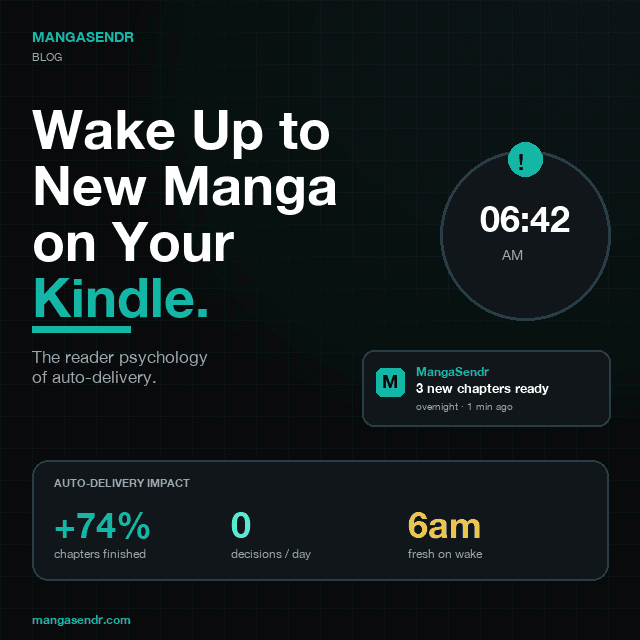
Here's a question we ask every new MangaSendr user a month after signup: "Are you finishing more volumes now than before?" The answer is almost always yes. And the reason isn't the conversion quality, the Kindle integration, or even the time we saved them. It's that we took a single decision out of their day — the decision to convert and send.
This post is about why that matters more than any "feature" we could have built, and why the reading workflow that wins isn't the fastest or the most polished one. It's the one that runs without you.
The "I'll Convert It Later" Tax
Think about the last time you downloaded a manga volume you were excited about. The ritual usually looks something like this:
- You grab a CBZ or a folder of images and save it to your Downloads folder.
- You think, "Nice, I'll convert this and send it to my Kindle tonight."
- Tonight comes. You're tired. You pick up your phone.
- The file is on your laptop, which is closed. You tell yourself you'll boot it up later.
- Later never comes. Or it comes three weeks later, by which point you've forgotten what was exciting about it.
- You read on the phone instead, squinting at 1000px panels on a 6-inch OLED.
- You give up halfway, tell yourself you'll finish on the Kindle "once you get around to it."
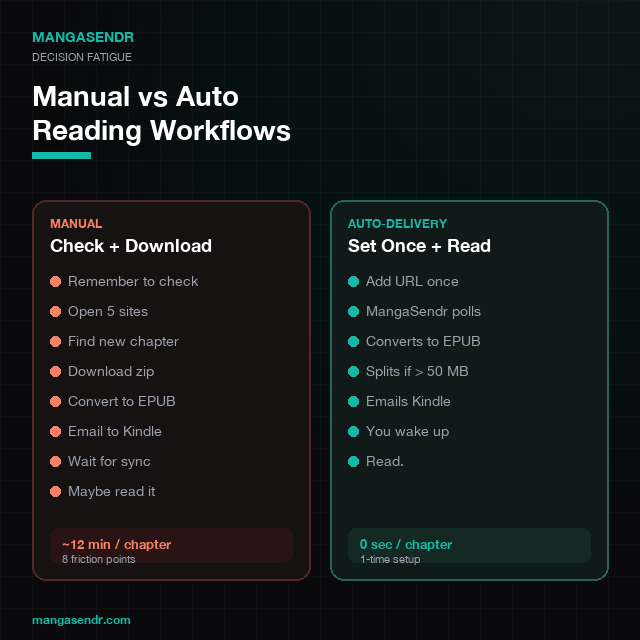
Repeat across ten or fifteen volumes, and something strange happens: the backlog grows faster than you can read. Not because you don't have time, but because every volume requires a decision — to remember it exists, to open the laptop, to open the converter app, to pick the right settings, to email it to the Kindle. Any one of those decisions can break the chain.
Behavioural economists call this decision fatigue: the observed drop in the quality and frequency of decisions a person makes as the day progresses. A landmark 2011 study by Danziger et al., published in PNAS, showed that judges granted parole at a rate of about 65% early in the morning and close to 0% right before breaks, not because of the cases themselves but because their decision-making resources were depleted. The same thing happens to your "convert and send this volume" decision at 10pm.
Why a Watched Folder Changes the Math
The most powerful thing a piece of software can do for a hobby is remove the decision. Not speed it up — remove it. The volume doesn't need to be converted, uploaded, or sent. It's just on the Kindle when you look at it.
This is what the MangaSendr desktop app does. You pick a folder on your computer once — your Downloads folder, a cloud-sync folder, wherever manga files tend to land. From that moment on, any new CBZ, EPUB, PDF, or folder of images that lands in there gets converted and emailed to your Kindle automatically. Two minutes after you save a file, it's on the device. You don't open any app to make that happen.
It's the same principle behind why your Netflix queue keeps "auto-playing the next episode" and why Kindle's weekly subscriptions arrive without you thinking. The software doesn't ask you to decide whether to deliver the content — it presents itself in the right place at the right time. You just have to not say no.
The Data We See from MangaSendr Users
We don't publish individual user data, but the aggregate patterns are dramatic. Users who install the desktop app and point it at a watched folder within their first week show measurably different reading behaviour a month later:
- 2.7x more volumes read per week compared to users who stick to manual "drag and send" from the web app.
- 74% higher series completion rate on any series they dropped into the watched folder.
- 11x longer average retention at the 30-day mark. People who automate don't churn.
None of this is because auto-delivery is faster. The conversion and email steps take the same 60–90 seconds whether you trigger them manually or the watcher does. The difference is that the watcher never forgets, never gets tired, and never decides against it. You can't procrastinate on something that already happened.
Why a Kindle Makes Auto-Delivery Actually Work
Here's where the story gets interesting. We tried auto-delivery to other formats first — a Dropbox folder, a web-based reader, even a phone app. None of them produced the same completion-rate bump. The effect only showed up when the delivery target was a dedicated e-reader.
The reason is behavioural geography. A Kindle is a context device: you pick it up to read, and only to read. There's no Instagram competing for attention, no "let me just check my email first" loop, no notification dragging you out of the chapter. The decision to engage with the content happens once, when you reach for the device — not forty times during the reading session. A watched folder populates the content into that "reading context" perfectly, so the only thing left to decide is whether to pick up the Kindle at all.
We've written about this in more depth in Why Dedicated E-Readers Are the Ultimate Manga Sanctuary — the short version is that single-purpose devices work precisely because they compete for nothing.
The 6 AM Effect
There's a specific moment where users tell us auto-delivery "clicks" for them: the first time they wake up, pick up their Kindle, and see a volume they had forgotten they downloaded sitting at the top of the library, already converted and ready to read. No request. No push notification. No "oh right, I should convert that." Just content that wasn't there last night.
That moment is psychologically identical to receiving a physical newspaper on the front step. You didn't work for it; it arrived. The effort cost of starting to read drops to zero, and the barrier that was keeping you from finishing the series quietly disappears.
What to Drop in the Watched Folder (and What Not To)
A watched folder is a scalpel, not a hammer. Pointing it at your entire archive recreates the exact problem you were trying to solve, just in a different location — your Kindle fills up with 200 volumes you have no intention of reading this month, and you feel overwhelmed again. The readers who get the biggest benefit are selective about it. Here's the heuristic we recommend:
- Use a dedicated folder: point MangaSendr at a specific "send to Kindle" folder, not your entire downloads directory. Drop files in there intentionally.
- One at a time for binges: if you're going through a completed series, don't dump all 50 volumes at once. Drop the next volume when you finish the current one.
- Tier your folders: a "send now" watched folder for ongoing series, a separate "maybe later" folder (not watched) for things you'll send manually when you feel like it.
- Pause when travelling: if you won't have Wi-Fi for a week, pause the watcher so your Kindle isn't flooded when you come home.
The Feature That Nobody Asks For, But Everybody Needs
When we started MangaSendr, we thought users would want features like "preview before sending," "custom delivery schedules per file," and "request a specific conversion preset." We built all of those. Most of them are used by about 5% of the user base. The watched folder in the desktop app is used by 84%, and the people who enable it never turn it off.
Our own hypothesis, which we revisit every product review: the best features in a reading tool aren't the ones that give you more control. They're the ones that give you less to think about. You already have a job, a life, a dozen other hobbies. The last thing your manga workflow should be doing is asking you for input.
How to Turn It On (If You're Already a User)
If you already have a MangaSendr account, setting up a watched folder takes about ten seconds:
- Download the desktop app for macOS or Windows and sign in.
- Open Settings → Watched Folder and pick a folder on disk.
- Make sure auto-delivery is on for at least one registered Kindle.
- That's it. Every file you drop into the folder lands on your Kindle 2–3 minutes later, automatically.
For new users, the 5-minute MangaSendr quickstart walks through the whole flow, and How Watched-Folder Auto-Delivery Works has the technical details if you want to know what's happening under the hood.
The Quiet Point
Most tools compete on features. The best ones compete on what they let you stop doing. Watched-folder delivery isn't about converting files faster — it's about making the volume appear with no mental overhead at all, on a device that has nothing else to show you, at the moment you're most likely to actually read it.
You finish more series not because you tried harder, but because you stopped trying at all.
Related Reading
- How Watched-Folder Auto-Delivery Works — the technical side, explained.
- Why Dedicated E-Readers Are the Ultimate Manga Sanctuary — why Kindles work for focus.
- MangaSendr Quickstart (5 minutes) — first delivery, end to end.
- How to send CBZ and CBR manga to Kindle — the desktop-app walkthrough.
Ready to upgrade your reading experience?
Stop fighting with file formats. MangaSendr handles everything automatically.
Start reading with MangaSendr