Why Standard Images Look Bad on Kindle (And How to Fix It)
MangaSendr Team
2025-02-22
1 min read
The Physics of Electronic Ink
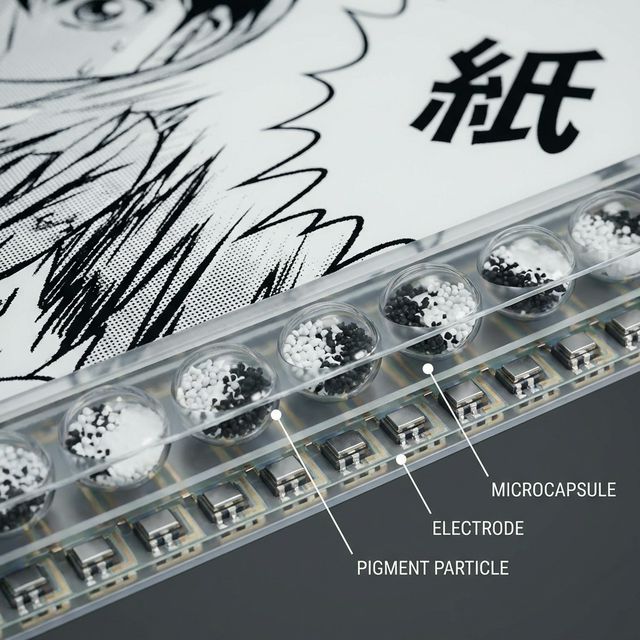
Unlike your phone screen which shines light at you, an e-ink screen relies on ambient light reflecting off tiny capsules of titanium dioxide (white) and carbon black (black).
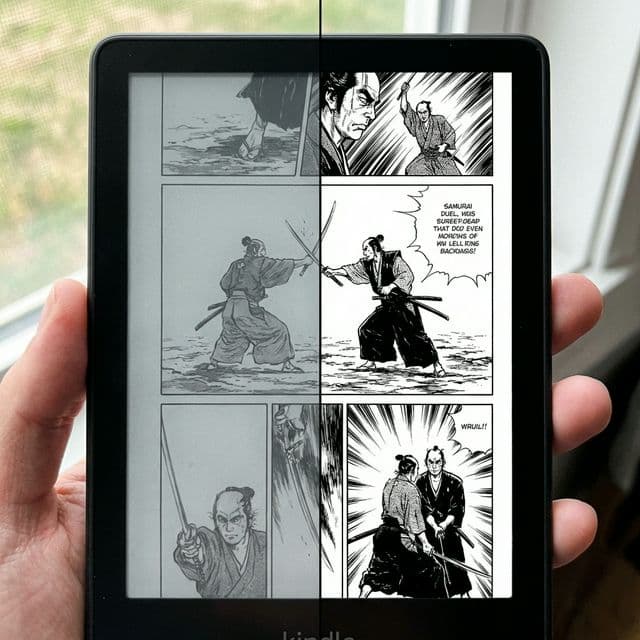
Because of this physical mechanism, "black" on a Kindle is actually a dark gray, and "white" is light gray. The contrast ratio is much lower than an OLED screen.
Why Raw Manga Files Fail
Manga is drawn in high-contrast black and white. But when digitized, scanners often introduce gray noise. On a computer screen, this looks fine. On an e-ink screen with only 16 shades of gray, this noise creates a muddy, washed-out image.
The MangaSendr Enhancement Pipeline
We don't just copy files. We remaster them for the medium:
- Adaptive Contrast Stretching: We analyze the histogram of every page and stretch the contrast to ensure blacks are true
#000000and whites are#FFFFFF. - Smart Sharpening: E-ink screens can look soft due to their matte coating. We apply an unsharp mask to make line art crisp.
- Floyd-Steinberg Dithering: For gradients (like shading tones), we use advanced dithering algorithms to simulate more shades of gray than the screen physically supports, preventing "banding".
Tags:
TechnologyE-InkGuide
Ready to upgrade your reading experience?
Stop fighting with file formats. MangaSendr handles everything automatically.
Start reading with MangaSendr